


- This event has passed.
PivotTable Course in Excel
PivotTable Course in Excel
24 And 25 February 2026 (08h30 to 12h30)
Learn how to master PivotTable and create Professional Reports in Excel
Online io Transmission Live IO Use of the ZOOM Web Conferencing App
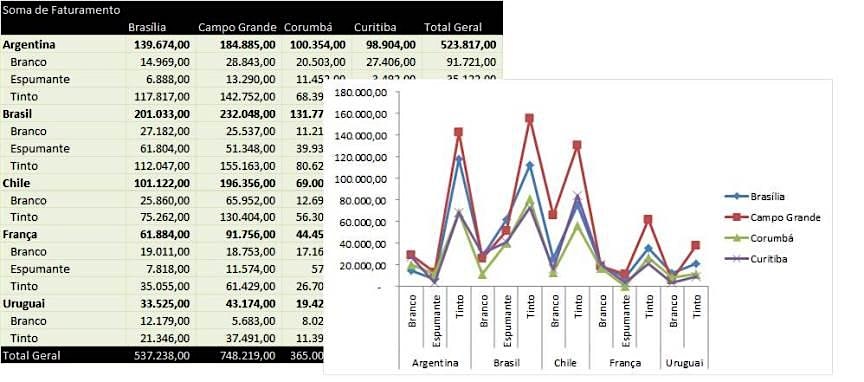
A Dynamic Table it is one of the most powerful tools in Excel for report creation, data consolidation and data transformation into information.
O 8-hour course it aims to teach how to work with the dynamic table from a more basic level so that you do not use the tool yet, until the deepening of its functions more advanced. At the end of the course you will be able to use the dynamic table to solve the problems of your day-to-day in your company.
Public Target
Professionals from any field who need to analyze, summarize and present data with agility: analysts, assistants, coordinators, managers, controllers and other Excel users.
Programmatic Content of dynamic Table Course in Excel
Data preparation and structuring
- Preparing the data for the creation of a pivot table
- Using tables as a basis for creating a pivot table
- Working with more than one database in the pivot table using Power Query and table relationships
Creating a PivotTable
- The fields, areas, and items of a pivot table
- Sorting and filtering the data in the pivot table
- Creating reports from report filters
- Formatting the values of the pivot table
- Drill Down & Double Click
- Working with empty cells
- Updating the pivot table and changing the data source
Layouts and Data Presentation
- Dynamic table formatting and styles
- Setting the layout: Subtotals, General totals, Report layout, and blank lines
Analysis Using the PivotTable
- Group / Auto and Manual Ungroup by date, text and number
- Summarize values by: Sum, count, average, minimum and maximum
- Show values such as: % of the General Total, % of, difference of, % Difference of, Accumulated Sum in and % Accumulated Sum in
- Conditional formatting in pivot tables
Dynamic graphics creation
Using Data Segmentation (Slicers) for dynamic reporting, or Dashboarding
Professional Report Creation
- Using InfodadosTableDynamics: Disabling, Simple Reporting, and Dynamic Reporting
- Calculated Field Creation
- Calculated Item Creation
- Report Automation
In addition to advanced tips and breakdown of pivot table options.
Hourly Charge: 8 Hours
Instructor
Paulo Jose Mendes
Engineer graduated from USP, specialization in Engineering Production by the Vanzolini Foundation and with a Master in Quality by UPC Barcelona. Founding Partner of Barcino Solutions 2010 Excel for Business, having already taught Excel courses for companies of different sizes, such as: Johnson & Johnson, Boticario, Siemens, Ecorodovias, JBS, Polenghi, Coca-Cola, GE, among others.
Important Information
Date: 24 And 25 February 2026
Schedule: 08h30 to 12h30
Investment: R$ 1150. Special condition for paid registrations until February 10, 2026: R$ 950. This value includes the course, material and certificate in electronic media.
Modality: Online Broadcast & The course will be broadcast live and students will be able to watch on a computer that has internet access. Students will be able to interact with the instructor, making comments and asking their questions during the course.
Did you finish the training and still have any questions?
After the end of the training, students will have 30 days to solve their doubts with the teacher by email.
This training can also be conducted in company in face-to-face or online format.
More Information about the Course of PivotTable in Excel contact us by phone (11) 3230-2714 or access the link: https://bit.ly/3IpqwSc

 Português do Brasil
  English
  Español
  Deutsch
  香港中文
香港中文  Русский
  हिन्दी
  Français
  Italiano
  日本語
日本語  العربية
  繁體中文
繁體中文  বাংলা
বাংলা  Български
  Čeština
  Dansk
Dansk  Ελληνικά
  Suomi
Suomi  Hrvatski
  Magyar
  Bahasa Indonesia
  한국어
한국어  Lietuvių kalba
  Nederlands
  Norsk bokmål
  Polski
  Português de Angola
  Português
  Română
  Slovenčina
  Slovenščina
  Svenska
  ไทย
ไทย  Türkçe
  Українська
  Tiếng Việt
  简体中文
简体中文  Afrikaans
  Íslenska
  Luxembourgish
  Bosanski
  Հայերեն
  Shqip
Shqip  Kiswahili
  فارسی
فارسی  Српски језик
  اردو
اردو  Latviešu valoda
  Català
  Eesti
Eesti  Bahasa Melayu
  English (Australia)
  English (Canada)
  English (UK)
  English (New Zealand)
  English (South Africa)
  Cebuano
  Bashkir
  Acehnese
  Bhojpuri
  Français de Belgique
  ಕನ್ನಡ
ಕನ್ನಡ  Deutsch (Schweiz, Du)
  Deutsch (Österreich)
  كوردی
كوردی  עִבְרִית
  नेपाली
  Беларуская мова
  Quechua